Senior Portrait Were Posted Here Until 1/26/24
If you think there may be an error with your senior portrait, please contact the yearbook staff directly at [email protected]
Senior Pictures were due Nov. 17th, 2023
Senior Photo Guidelines
Specifics:
*** Please note that it is each student’s responsibility to check the proofs posted on the website in January/February to make sure that their picture, name and signature are correct. More specific dates for posting the photos will be found on this website.
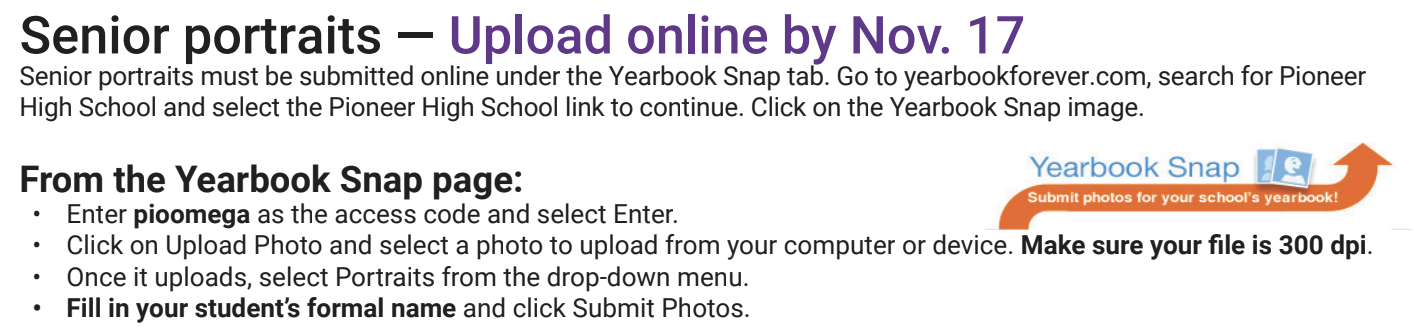
DIRECTIONS FOR UPLOADING TO YEARBOOKFOREVER.COM:
- Color or black and white (the yearbook is all color, so most students choose color.)
- Full face and shoulders, no hands
- No hats or extra objects
- All pictures will be cropped so that they are head and shoulder shots
- *Suggested* to avoid spaghetti straps or strapless dresses/tops as they often do not crop well
- Please submit your photo to yearbookforever.com. Directions are below.
- Digital images should be a minimum of 300 dpi.
- We will use the student name listed in PowerSchool unless otherwise notified. Any alternative name to the primary one in PowerSchool must be registered as a "preferred name" in PowerSchool. If you would like to use your preferred name in all 2024 yearbook references, please complete this form by January 31, 2024.
*** Please note that it is each student’s responsibility to check the proofs posted on the website in January/February to make sure that their picture, name and signature are correct. More specific dates for posting the photos will be found on this website.
DIRECTIONS FOR UPLOADING TO YEARBOOKFOREVER.COM: